
All media boxes on retail shelves look deceptively similar, yet subtle architectural differences determine whether you enjoy cinema-grade playback or endure constant buffering. As display resolutions scale past Ultra HD, upgrading your home theater requires understanding which hardware specifications truly drive picture quality.
This comprehensive guide and streaming device review walks you through seven essential hardware checks. Whether you plan to make a direct streaming box buy today or want to see if your current setup needs an upgrade, here is how to distinguish capable silicon from misleading marketing buzzwords.
Why 8K Capabilities Matter in 2026
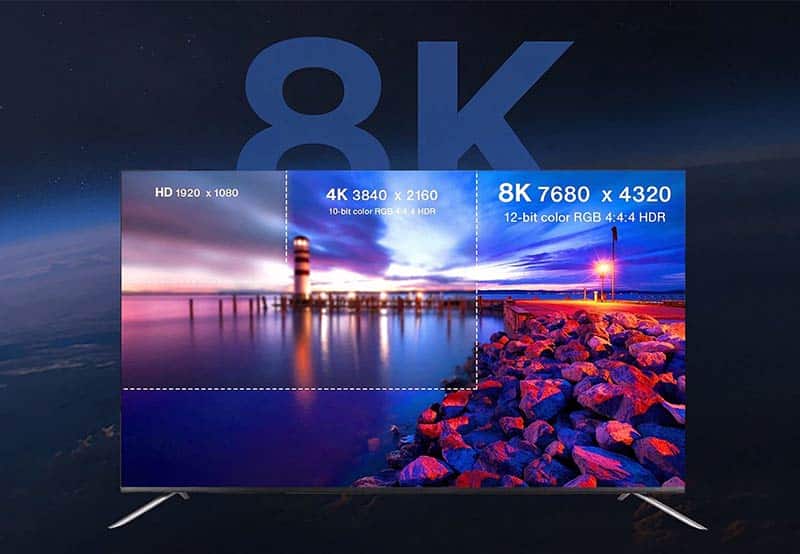
While mainstream broadcasting remains centered around 4K, native 8K streaming feeds and AI-driven upscaling engines are transforming high-end home entertainment. Picking the right hardware unlocks the full dynamic range of your panel and preserves high-bitrate audio passthrough. Choosing the wrong unit leads to frame drops, thermal throttling, and desynced audio.
Key Takeaway for Buyers: Even if your current panel is a 4K display, an 8K-capable media player provides substantial headroom over a standard android tv box 4k. With next-generation video codecs (such as AV1) and advanced upscaling chipsets, an 8K unit processes 4K streams with virtually zero latency, outperforming legacy hardware across the board.
The 7 Critical Hardware Checks for 2026
If you are shopping for a modern 4k android tv box or an 8K flagship, evaluate these seven core engineering benchmarks before completing your purchase:
- Native Hardware Codec Decoding (AV1 & HEVC):
True 8K decoding requires hardware acceleration for AV1 and HEVC (H.265) at 60fps. Avoid obsolete chipsets that rely on software decoding, which spikes temperatures and causes stutter. - Modern Operating System:
Look for Android 12 or newer. Modern operating systems deliver seamless background process management, enhanced Widevine DRM stability, and prolonged app compatibility. - RAM Headroom (4GB Minimum):
Demanding high-bitrate streams saturate memory quickly. Starting with at least 4GB of LPDDR4/LPDDR5 RAM prevents home screen lag when multitasking between apps. - Storage Capacity (64GB+):
A minimum of 64GB of eMMC internal storage ensures plenty of room for heavy media libraries, streaming cache, and external media center add-ons. - High-Throughput Connectivity (Wi-Fi 6 & Gigabit LAN):
Uncompressed high-resolution playback demands massive throughput. Wi-Fi 6 or a hardwired Gigabit Ethernet port ensures steady performance, preventing bitrate dips during peak household internet use. - Open OS vs. Walled Garden:
Ensure the operating system supports flexible third-party app management and APK installation rather than locking you into restricted, advertising-heavy proprietary storefronts. - Quality-of-Life Features:
Prioritize models with active or aluminum heatsink cooling, voice-enabled Bluetooth remotes, picture-in-picture (PiP) multitasking, and ad-free launchers.
Comparison: Dedicated 8K Streaming Box vs. 4K Dongles vs. Smart TVs
When evaluating a streaming box buy, consider how dedicated hardware stacks up against traditional built-in operating systems and compact media sticks:
| Feature / Criteria | Smart TV Native OS | Standard TV Streaming Stick | Dedicated 4K / 8K Android TV Box |
| Decoding Headroom | Baseline 4K; slows down over time | Standard 4K HDR | Native 8K / 4K 60fps AV1 hardware decoding |
| Thermal Dissipation | Trapped inside TV enclosure | Prone to throttling under load | Dedicated internal aluminum heatsink/chassis |
| System Fluidity | Degrades after 1–2 years | Moderate (1GB–2GB RAM) | Fluid multitasking (4GB+ RAM, 64GB storage) |
| App Freedom | Closed proprietary store | Limited custom app sideloading | Open Android environment / Sideload support |
| Hardware Longevity | Requires full panel replacement | Replace every 2 years | Long lifecycle with regular firmware updates |
If your living room already relies on a compact tv streaming stick, upgrading to a dedicated top streaming box eliminates the thermal throttling and memory bottlenecks common in pocket-sized dongles.
8K Box vs. Smart TV: Do You Need Both?
Usually not. Replacing an entire television simply because the built-in smart interface feels sluggish is expensive and unnecessary. Adding a high-performance top streaming device to an existing screen via HDMI is the most cost-effective way to modernize your entertainment system.
If you already own what you consider the best 4k streaming box, jumping to 8K hardware gives you future-proof AV1 processing and faster internal bus speeds, ensuring your display runs smoothly for years to come.
How Much Should You Spend?
Balanced mid-range to high-performance boxes generally retail between $100 and $300.
- Under $70: Often uncertified hardware featuring counterfeit specs, outdated Android versions, and non-existent firmware updates.
- $100 – $200: The sweet spot for a reliable 4k streaming device or balanced 8K entry player featuring 4GB/64GB configurations and robust Wi-Fi 6 connectivity.
- $250+: High-end media nodes designed for high-bitrate home theater enthusiasts, audiophiles needing advanced audio passthrough, and local NAS streaming.
Top Picks for 2026
- Balanced Everyday Pick: Zubliz Z1
Specs: Android 12, High-Efficiency Quad-Core SoC, 4GB RAM, 64GB Storage, Wi-Fi 6, Voice Remote, Split-Screen Display.
Why It Stands Out: Delivers an ad-free user interface, snappy app switching, and sustained decoding without overheating, making it a compelling alternative to any standard best iptv box or generic mini-PC. - Premium Home Cinema Pick: High-End Tier Media Player (Amlogic S928X / RK3588 Platform)
Why It Stands Out: Offers dual-band multi-gigabit Ethernet, native AV1 8K decoding at 60fps, and support for high-fidelity audio formats (Dolby Atmos & DTS:X passthrough).
Step-by-Step: How to Set Up Streaming Box Hardware for Peak 8K Playback
Follow these quick steps on how to set up streaming box equipment to avoid bandwidth bottlenecks:
- Connect via Ultra High Speed HDMI: Use a certified HDMI 2.1 cable to connect the box to your TV’s high-bandwidth port (often labeled 4K/8K 60Hz or eARC).
- Configure Network Connections: While Wi-Fi 6 delivers excellent performance, connecting via a Cat6 Ethernet cable directly to your router offers the lowest latency and zero packet loss.
- Calibrate Display Resolution: In the system settings menu, set your display output to match your panel’s native refresh rate and enable dynamic HDR matching (Dolby Vision / HDR10+).
- Organize Audio Passthrough: If using an external AV receiver or soundbar, select “Audio Passthrough (Bitstream)” to let your audio system decode uncompressed surround sound.
Frequently Asked Questions (FAQ)
Q: Do I need an 8K TV to use an 8K streaming box?
A: No. An 8K streaming box is backwards-compatible with all 4K and 1080p displays. Even on a 4K TV, the extra processing power, higher RAM capacity, and AV1 decoding ensure faster app load times and smoother playback than a standard entry-level 4k streaming device.
Q: What internet speed do I need for stable 8K streaming?
A: Unlike 4K streaming (which requires 25 Mbps), genuine 8K content demands a consistent download speed of 80 to 100 Mbps per stream due to high compression bitrates. For homes with multiple active devices, a 300 Mbps or fiber connection is highly recommended.
Q: Is a dedicated box better than a tv streaming stick?
A: Yes, especially for sustained playback. A compact tv streaming stick has limited surface area for passive cooling, which often triggers thermal throttling and system lag during high-bitrate sessions. A dedicated box houses larger heatsinks, superior antennas, and additional I/O ports.
Q: What makes an 8K box different from the best 4k streaming box models?
A: An 8K box typically integrates newer SoCs with hardware-level AV1 decoding, larger RAM configurations, and HDMI 2.1 video output. These components provide substantially more headroom for next-generation media than a standard android tv box 4k.
Ready to Upgrade Your Entertainment Setup?
Choosing the right media player comes down to matching your viewing habits with reliable, certified hardware. If you need help finding the ideal match for your display model, room acoustics, and budget, feel free to contact our hardware specialists or explore our full product lineup for customized advice.